
Fix Foldable Battery Shut-Off 2026
Experiencing a sudden battery shut off on your foldable phone? Uncover the common causes and learn step-by-step solutions to diagnose and fix the issue.
 Editorial
When your foldable phone suddenly goes dark, it's easy to jump to the worst conclusion. But a battery shut off is rarely about the battery just giving up. It's more like a smart circuit breaker in your house flipping off to stop a power surge from frying your electronics. This shutdown is your phone’s built-in defense mechanism, protecting its incredibly complex and delicate internals.
Understanding Why Your Phone Suddenly Shuts Down
That abrupt black screen is often a sign that your phone's safety systems are working exactly as they should. Modern smartphones, and especially intricate devices like foldables, are packed with sensors and protective circuits. They’re constantly monitoring internal conditions, and a sudden power-down is the last resort to prevent permanent damage.
Instead of panicking, let's break down the common reasons for a battery shut off. Once you understand the root cause, you can diagnose the issue with confidence. The problem usually traces back to a few key areas, many of which are particularly relevant to the unique design of foldable phones.
Key Triggers for a Shutdown
The very nature of a foldable phone—with its flexible screen and complex hinge—introduces specific stress points that can lead to power problems. Getting a handle on these triggers is the first step toward fixing the issue and stopping it from happening again.
The most common culprits include:
- Thermal Overload: Pushing your phone hard with intense gaming, editing 4K video, or even just using GPS in a hot car can cause the processor and battery to overheat. The phone shuts down automatically to cool off before any components get cooked.
- Software Glitches: A rogue app or a buggy system update can wreak havoc on your phone's power management software. This can cause it to misread the battery level and shut down, even when you have plenty of charge left.
- Physical Stress on Components: The simple act of opening and closing your foldable phone hundreds of times a day puts strain on everything inside. Over time, this can stress the flexible ribbon cables connecting the two battery halves, potentially causing a loose connection or outright failure.
Think of the battery management system as your phone’s central nervous system. When it detects a threat—whether it's extreme heat, a critical software error, or an unstable power connection—its only instinct is to shut everything down to ensure survival.
By digging into these factors, you can stop worrying about the problem and start actively solving it. To help you quickly pinpoint the issue, here’s a quick diagnostic guide.
Quick Diagnostic Guide to Battery Shut Off Causes
This table gives a brief overview of the most common reasons your foldable phone might suddenly power down, helping you quickly identify the potential issue.
| Potential Cause | What It Means for Your Phone | Common Triggers |
|---|---|---|
| Thermal Shutdown | The phone's internal temperature exceeded safe limits, triggering a protective power-off. | Intense gaming, GPS use in direct sunlight, fast charging in a hot environment, or using a case that traps heat. |
| Software Bug | A glitch in an app or the operating system is causing the power management system to malfunction. | A recent OS update, a newly installed app, or corrupted system files. |
| Battery Health Decline | The battery is old and can no longer provide stable voltage, especially under heavy load. | The battery is over 2-3 years old, or the phone dies suddenly when the battery percentage drops below 30-40%. |
| Protective Circuitry | A safety circuit detected a voltage spike, a short, or a faulty charging accessory. | Using a cheap or damaged charging cable, a power surge from the wall outlet, or an incompatible charger. |
| Physical Disconnect | An internal component, like a battery connector or flex cable, has become loose from a drop or hinge wear. | The phone was recently dropped, or the issue happens specifically when opening or closing the device. |
This guide is your starting point. By matching your phone’s symptoms to these causes, you're already on your way to figuring out the next steps.
The Most Common Causes of Battery Shut Off
When your phone suddenly dies on you, it’s almost never a random glitch. A battery shut off is usually a deliberate last-ditch effort by your phone's internal systems to prevent some serious damage. Getting to the root of the problem is the first step toward a fix, so let's dig into the five most common culprits behind these frustrating shutdowns.
Thermal Protection and Overheating
One of the biggest reasons for a sudden power-down is simply heat. Your phone is a tiny powerhouse, and all those components crammed together generate a surprising amount of heat, especially under pressure. Think gaming, streaming 4K video, or even just using GPS navigation on a hot day.
To keep the delicate electronics from frying, built-in sensors are constantly taking the phone’s temperature. If things get too toasty—usually around 95-100°F (35-38°C)—the phone will perform an emergency shutdown to cool off. It’s not a bug; it’s a critical safety feature doing exactly what it's supposed to do.
Software Conflicts and Firmware Bugs
It's not always about the hardware. Sometimes, the problem is buried in your phone's code. A buggy app, a corrupted system file, or a flawed OS update can wreak havoc on the battery management system.
For example, you might have a rogue app that's stuck running in the background, guzzling power and tricking your phone into misreading its own battery level. This can trigger a shutdown even when your battery indicator says you still have 30% or 40% left. The software essentially panics, thinking the battery is dead when it has plenty of juice.
Think of it like a faulty fuel gauge in a car. Even if the tank is half full, a broken sensor might tell the engine it's empty, causing it to stall unexpectedly. A software glitch can create the same false alarm for your phone's battery.
Natural Battery Degradation
Every battery has a limited number of trips it can make. The lithium-ion batteries in our phones slowly wear out with every single charge cycle. After two or three years of daily use, a battery just can't hold a charge or deliver stable power like it used to.
An aging battery struggles to keep up, especially when you ask for a sudden burst of power—like when you open the camera or launch a demanding app. That sudden demand can cause the voltage to nosedive, and the phone's protective circuits will cut the power to prevent data corruption. This is the classic reason why a phone that seems fine at 80% suddenly dies the moment it hits 20%.
Internal Safety Circuit Failures
Your phone's battery isn't just a simple cell; it's a smart piece of tech with its own bodyguard—the Battery Management System (BMS). This tiny circuit board lives on the battery and protects it from all sorts of dangers:
- Overcharging: Stops too much current from flowing in.
- Over-discharging: Prevents the battery from draining to zero, which can kill it for good.
- Short circuits: Cuts power instantly if a short is detected.
- Voltage spikes: Shields the battery from a cheap or faulty charger.
If this little bodyguard detects any threat, its one and only job is to slam on the brakes and cut the power. The result? A sudden battery shut off.
Physical Stress and Hinge Damage
This is a big one, especially for foldable phones. The simple act of opening and closing your device puts constant mechanical stress on the incredibly fine flex cables and connectors running through the hinge. These are the lifelines connecting the battery to the main logic board.
After thousands of folds, these internal connections can start to loosen up or get damaged. A weak connection can lead to intermittent power loss, causing shutdowns that seem to happen for no reason at all—but might actually be triggered by the simple act of folding or unfolding your phone.
How to Spot a Failing Battery Before It Shuts Down
A battery that completely dies on you rarely happens out of the blue. Your phone almost always sends out warning signals before it hits a critical failure point. Learning to read these subtle clues is the key to catching a problem early—and avoiding an unexpected shutdown when you need your phone the most.
Think of it like the low fuel light in your car. It’s a clear warning to take action before you’re left stranded on the side of the road. Your phone gives you similar, if less obvious, signals that its power source is struggling. Paying close attention can save you a world of frustration.
Key Symptoms of Battery Failure
The most dramatic sign of a failing battery is an erratic percentage drop. One minute you’re cruising with 40% life, and the next, your phone flashes a low battery warning and dies. This is a classic sign that the battery can no longer provide a stable voltage, causing the phone’s sensors to make wildly inaccurate guesses.
Another common symptom is your phone feeling unusually warm, even when you aren’t pushing it with demanding tasks. An aging or damaged battery has to work much harder to hold its charge, and all that extra effort generates heat. If the back of your phone is consistently hot to the touch, consider it a red flag.
You might also notice a dip in overall performance. Frequent app crashes, a laggy interface, and slow response times can all be tied to an unstable power supply. The phone's processor often slows itself down to conserve what it thinks is a dwindling and unreliable power source, making the entire device feel sluggish.
Key Takeaway: Sudden, steep drops in battery percentage are one of the most reliable indicators that your battery's health is compromised. The reading becomes unpredictable because the internal chemistry can no longer sustain a consistent power output.
A Simple Diagnostic Checklist
Before you jump to conclusions, run through a few simple checks to diagnose the problem. This process helps you rule out software glitches and zero in on the battery itself.
- Check Battery Health in Settings: Most modern phones have a built-in battery health monitor. Dive into your device's settings and look for the "Battery" or "Device Care" section. A capacity reading below 80% suggests significant wear and tear. You can keep a closer eye on this metric with a dedicated tool; learn more by exploring an Android battery widget.
- Use Safe Mode: Booting your phone into Safe Mode is a great trick because it disables all third-party apps. If your phone behaves normally and doesn't shut down in this mode, a misbehaving app is the likely culprit, not the battery itself.
- Perform a Physical Inspection: Carefully examine your foldable phone. Look for any signs of swelling or bulging, especially near the hinge or along the screen's edges. A swollen battery is a serious safety hazard and needs immediate professional attention. A damaged hinge can also sever internal connections, leading to power issues.
Your Step-by-Step Guide to Fixing a Battery Shut Off
When your foldable phone suddenly dies, it’s easy to feel a jolt of panic. But don't worry. There's a clear, methodical path to getting your device powered back on, and it starts with the simplest solutions first.
Let’s walk through the process together, step by step, ruling out the easy stuff before we get into anything more complex. Most of the time, the fix is simpler than you think.
Start with Immediate Physical Fixes
Your first move should always be the easiest one. If your phone shut down after being in a hot car or sitting in direct sunlight, the cause is almost certainly overheating. Just move your phone to a cool, shaded spot and let it rest for at least 15-20 minutes. Whatever you do, don't stick it in the fridge or freezer—that rapid temperature change can create condensation inside and cause permanent damage.
If heat wasn't a factor, the next step is a forced restart. This isn’t the same as turning it off and on again. It’s a hardware-level command that cuts the power and forces the system to reboot, clearing out any temporary software glitches that might have caused the shutdown.
- For Samsung Galaxy Z Fold/Flip: Press and hold the Side Key and the Volume Down button at the same time for about 10-15 seconds.
- For Google Pixel Fold: Press and hold the Power button for about 30 seconds until you see the device restart.
This simple action is often all it takes to resolve a software conflict that triggered the battery to shut off.
This decision tree gives you a great visual for figuring out what your phone's symptoms might be telling you about its battery health.
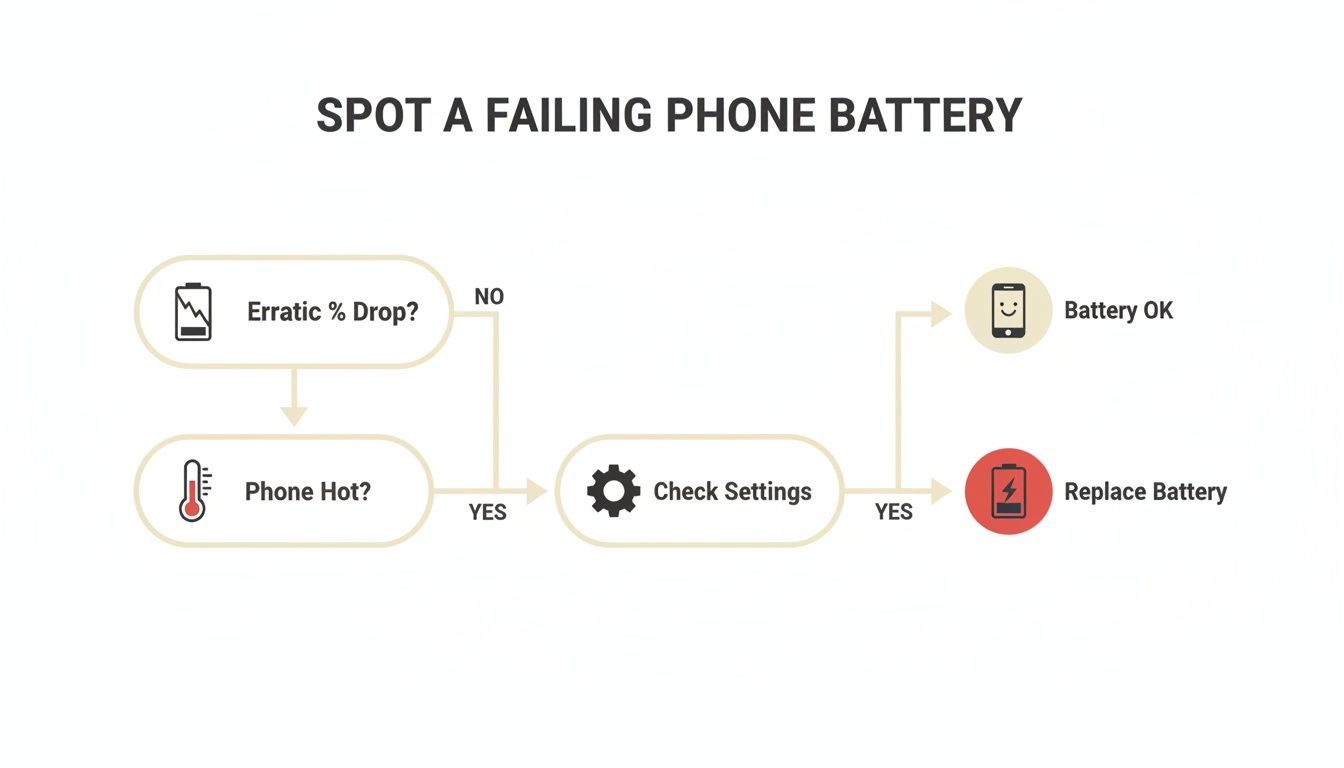
As the flowchart shows, things like weird battery percentage drops, overheating, and other system quirks are all clues pointing toward an aging or failing battery.
Move to Software and Power Solutions
If a forced restart didn't do the trick, the problem might be a little deeper in the software or have something to do with your charging gear. The next logical move is to check these potential causes.
First, try clearing your phone's system cache partition. Think of this as a temporary storage area for system files. If one of those files gets corrupted, it can cause all sorts of instability, including random shutdowns. The process is a little different for each device but usually involves booting into Recovery Mode. A quick search for your model will show you the right button combo. Don't worry—wiping the cache partition does not delete any of your personal data like photos or apps.
Next, take a hard look at your charging setup. Is it providing clean, stable power? A cheap or damaged charger can send inconsistent voltage to your phone, which often triggers its protective circuits to shut everything down. Using an uncertified charger is one of the fastest ways to stress your phone's internals and cause problems.
A reliable charger is like a clean fuel filter for your phone's battery. If the filter is clogged with impurities (unstable voltage), the engine (your phone) will sputter and stall. A high-quality charger ensures a pure, steady flow of power.
This is exactly why investing in a certified, high-quality power source is so critical for the long-term health of your foldable. To get a better sense of the tech behind safe charging, you can discover the power of a 45W Samsung fast charger and see how it helps maintain battery stability.
After you've cleared the cache and confirmed your charger is up to snuff, plug your phone in and let it charge for at least 30 minutes before trying to power it on again.
How to Prevent Future Battery Shut Off Issues
Fixing a sudden battery shut off is one thing, but making sure it never happens again is the real win. A few smart habits can go a long way in boosting your foldable's long-term health, keeping it powered up when you need it most.
Real prevention comes down to a mix of how you use your phone and the accessories you pair with it. It starts with the simple stuff, like where you leave it. Your phone's lithium-ion battery hates extreme heat or cold. Leaving it on a car dashboard in the summer sun is a surefire way to degrade the battery, making those annoying thermal shutdowns far more common.
Think about your charging routine the same way. Using cheap, uncertified chargers is like putting bad fuel in a sports car—it might work for a bit, but over time, the voltage instability puts serious stress on the battery's protective circuits.
Smart Charging and Case Selection
To play it safe, always use certified chargers and good-quality cables. This ensures a stable, clean stream of power that won't freak out the phone's internal safety systems. It's a small investment that pays off big time.
Just as important is the case you choose, especially for a foldable. A great case does more than just protect from drops; it helps the phone operate correctly. A poorly designed case can be a silent killer.
- Heat Dissipation: Cheap, bulky cases can trap heat and turn your phone into a mini oven. This makes thermal shutdowns more likely, even during normal use.
- Sensor Interference: Some cases use magnets that are too strong or placed incorrectly. On a foldable, this can confuse the phone's sensors, making it think the hinge is closed and triggering a shutdown.
- Physical Stress: A case that fits poorly can put constant pressure on the phone's frame and hinge. That little bit of extra stress adds up, contributing to wear and tear that can damage internal connections.
Choosing a case is about more than just looks; it’s an investment in your phone's lifespan. A high-quality case, like those from FoldifyCase, is engineered with precise cutouts, proper ventilation, and sensor-safe materials to protect without getting in the way.
The Critical Role of Physical Protection
With foldable phones, the biggest long-term risk is always physical stress on the hinge and the tiny flex cables inside. Every single time you open and close the phone, it causes a tiny bit of wear. A solid case with dedicated hinge protection is your best line of defense against damage that could sever a vital power connection.
This is non-negotiable for anyone using their foldable in rough environments like a construction site or a busy warehouse. The stakes are much higher than just inconvenience. According to UL Solutions' battery incident database, consumer products like phones have been linked to 2,178 injuries and 199 fatalities worldwide. These incidents often start with physical damage that leads to catastrophic battery failure. You can learn more from the official findings from UL Solutions' research.
By combining smart habits with the right gear, you can seriously cut down your risk of a random battery shut off. For more deep-dive strategies, check out our guide on how to extend your phone's battery life and keep your device running reliably for years.
Frequently Asked Questions About Battery Shut Off Problems
Let's clear up some of the most common questions we hear about foldable phone battery problems. Here are some quick, straightforward answers to give you more confidence in handling your phone's health.
Can a Poorly Designed Case Cause My Phone to Shut Off?
Absolutely. A case that's too tight or lacks proper ventilation can easily trap heat, forcing your phone into a protective thermal shutdown. It's not just about fit, either. Cases with poorly placed or overly strong magnets can mess with your foldable’s internal sensors, sometimes tricking the software into thinking the phone is closed or causing other glitches that lead to a shutdown.
This is why it's so important to use a case engineered specifically for your foldable model—one that guarantees a precise fit, allows for airflow, and won't interfere with any internal components.
Does Fast Charging Increase the Risk of a Battery Shut Off?
Not if it’s done right. Modern foldables are built to handle fast charging, but they expect you to use certified equipment. Plugging into a cheap, uncertified fast charger is a gamble. These chargers can cause overheating and put serious stress on the battery's protective circuits, which dramatically increases the risk of a safety shutdown.
Think of a quality charger as a smart power adapter. It communicates with your phone to deliver the optimal voltage without overloading the system. A cheap one just dumps power indiscriminately, which can easily trigger your phone's self-preservation mechanisms.
Investing in reliable accessories is more important now than ever. We've seen how fragile supply chains can be; battery shipments dropped by 14% in 2020 because of factory shutdowns, causing delays for even the biggest phone brands. This history shows why it pays to get high-quality accessories when you can, as market shifts can create shortages without warning. You can read more about global battery market shifts on indiatimes.com.
Is One Battery Shut Off a Sign of a Major Problem?
Not necessarily. A single, isolated shutdown—especially when it's scorching hot outside or during a massive software update—is usually just your phone's safety system doing its job. It’s when the shutdowns become a regular thing that you should be concerned. If it's happening daily or even weekly under normal conditions, you're likely dealing with a persistent issue that needs attention.
If you're seeing recurring shutdowns, go back through the diagnostic steps we covered earlier. Pay close attention to your battery health stats and what your apps are doing to pinpoint the real cause. When a foldable with these kinds of issues finally reaches the end of its life, it's crucial to know how to responsibly dispose of old cell phones to protect your data and the environment.
For accessories engineered to protect and enhance your foldable phone without causing interference, trust FoldifyCase. Explore our collection of premium cases and certified chargers designed for perfect compatibility at https://www.foldifycase.com.
Shop FoldifyCase foldable phone cases
Precision cases for Galaxy Z Fold & Z Flip — full MagSafe, S-Pen ready, zero bulk.